Technology
Knowledge Pitfalls in Productivity - Lessons Learned
Why do organizations still struggle with Knowledge Management?
You may have heard the saying "Thinking out loud?" I'm the type of person that thinks on paper: I flowchart, I list, I document! I'm also many years into my career and find it hard to believe that organizations still struggle with the same Knowledge Management problems as I saw early in my career. I'm sure you've seen many of these in your own job:
- Knowledge documented, but noone can find it easily (Knowledge App Sprawl).
- Knowledge disappearing (due to attrition).
- Knowledge maintenance issues
It's a real problem. I saw an infographic on Guru's site saying that 82% of leaders use five or more sources of knowledge throughout the day. Yes, I know that's a vendor site trying to sell a product, but that's still bonkers... Frankly, I don't know how businesses function when knowledge is so fragmented throughout the organization. I'm by no means an expert in Knowledge Management, but it's become a side study of mine over the past few years. Maybe it's a lofty goal, but I have to think knowledge disorganization is fixable.
Defining the Problem
Knowledge App Sprawl
Does your organization look something like this?
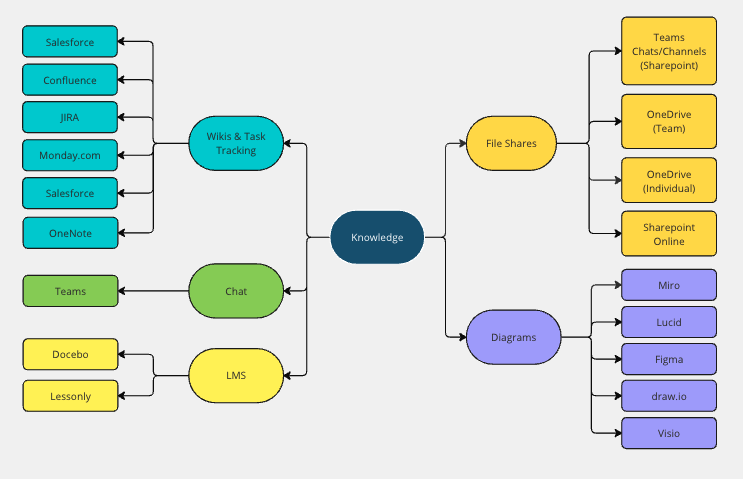
If you've read the Harry Potter books, you might be familiar with the "Doubling Charm" (Geminio) that made objects double upon touching them. Knowledge apps seem to sprawl in much the same way: Sharepoint (or OneDrive), Confluence, Notion, OneNote, Wikis, etc. Then, add the multiple whiteboarding/flowcharting apps on top of that - Figma, Jamboard, Visio Online, LucidChart, Miro, etc. Everything starts with a Powerpoint or Keynote presentation, recorded in Teams or Zoom, and placed on a share (or Stream) along with a huge pile of previous recordings. Then on top of that we add Email and Chat (Teams/Slack/etc). It's easy for knowledge to quickly spread out of control into various locations.
I've seen this happen most common as teams are allowed to pick their "tool of choice" for collaboration. I'm not sure if this is a way to help retain and attract talent, but it ultimately ends up detrimental to organizational alignment. Where did we align on a decision? Where was the story or use-case behind a certain feature? Where can I find information on <insert topic of your choice>?
Knowledge App Permissions
Layered on top of knowledge app sprawl is permission issues. Across much of my career, nearly all knowledge was permissioned to specific teams or users (private by default). I never understood this type of setup. As employees of the company, we all have the same goals we're working towards. With the exception of personally identifying information (knowledge that belongs to Human Resources), what harm comes from defaulting to read-access for all? Ideas come from anywhere, and I truly believe that outside perspective can ignite new innovation. Is it naive to think that employees can conduct themselves ethically while having open access to company proprietary information? I say this having experienced so many frustrating moments like this:
- Receive a link to a set of information from a coworker.
- Not permissioned to view said information - request permission.
- Wait... (minutes, hours, days?)
- Move on to other tasks while waiting.
- Finally get access but the forgot the original context of why I wanted to see it.
- Spend time getting back to the point where I was originally ready to consume the information shared.
Knowledge Authenticity
A byproduct of both knowledge sprawl and permission issues is Knowledge Authenticity. When the source-of-truth for knowledge isn't accessible, it tends to get copied to a new spot that is accessible. Whether that spot is a personally-accessible knowledge location (such as OneNote or Notion), or simply another "group share" location, you end up with bifurcated knowledge. Now, as the subject matter expert maintains that source material, other consumers of the information are no longer privy to the updates. The various forks of that information are not automatically updated due to permissioning (potentially because the original author has no permissions to the location of the second, third, etc copies).
Knowledge Disappearing
When teammates leave, emotions can be all over the place (happy, sad, angry, etc). Many times employee attrition takes a wealth of knowledge and years of experience out the door. On the off-chance they were a prolific documenter, there may be a wealth of knowledge that was shared with the team that may lessen that loss. However, I've experienced on numerous occasions where documents were stored in Knowledge Management systems specifically tied to a specific UserID, such as LucidChart, Visio, employee-specific OneDrive folders, etc. Thus, as IT deletes the user account and reclaims the software license, that information becomes inaccessible by anyone to which it was shared.
Knowledge Maintenance
Writing the document is the easy part. Keeping it accurate six months later is where knowledge management actually goes to die.
I've watched the same pattern play out almost everywhere I've worked. Someone writes a solid runbook or design doc. It's accurate the day it ships. Then the system changes, the process changes, the team reorganizes, and the document just sits there. Nobody's job description says "update the wiki when things change," so it doesn't, until someone follows stale instructions and gets burned.
The McKinsey Global Institute found that the average interaction worker spends something like 1.8 hours a day, roughly 20% of the workweek, searching for and gathering information. I'd bet a good chunk of that isn't failing to find a document, it's finding one, not trusting it, and going to ask a person instead because the wiki burned them last time. Panopto's research backs that up: six in 10 employees say they struggle to get the information they need to do their job well, even when it technically exists somewhere.
The root issue is there's no forcing function. Code has one: it breaks, tests fail, a pull request won't merge, and someone fixes it. A wrong paragraph in a wiki doesn't throw an error. It just quietly misleads the next reader, with no equivalent of a CI pipeline to catch it.
Why I Think GitLab Has the Right Model
I want to be precise about which company I'm crediting here, because it matters. GitHub's free tier defaults to public repos, which is great for open source, but that's a product setting, not a company culture. GitLab is the one that actually runs itself this way. "Public by default" is a written value in their own handbook: information is public unless someone can justify why it needs to be private. Not "ask permission to share." The reverse: justify why something needs to be locked down. That's the exact inversion of the SharePoint/Confluence default I complained about a few sections ago.
A few things about that model solve problems from the last two sections:
- Public by default, not private by default. The org has to justify locking something down, not justify opening it up. Most SharePoint sites and Confluence spaces default the other way, and nobody remembers to open them up later.
- Docs live next to the thing they describe. A README updates in the same merge request (what GitHub calls a pull request) as the code. Nobody has to remember a separate wiki edit in a separate tool, weeks later.
- Ownership is explicit. A CODEOWNERS file names exactly who reviews changes to a given path. Compare that to a wiki page with no author field and no one accountable for noticing it's wrong.
- History is the point, not an afterthought. Blame and commit history show who changed what and, with a decent commit message, why.
- One search bar, not five. Qatalog's research with Cornell's Ellis Idea Lab found that 44% of workers say siloed tools make it hard to even tell if work is being duplicated. Centralizing knowledge removes that whole category of "wait, did someone already do this?"
None of that fixes the last piece, though. Even with the mechanics right, one team's README reads like a design essay and another's is a bare list of commands, and a reader has no idea which one they're about to get until they've already opened it. That's not a formatting problem, it's an intent problem, and it's a different thing than app sprawl or permissions. This is where I think a framework like Diátaxis earns its keep. Created by Daniele Procida and now used by projects like Django, Canonical, and Cloudflare, it splits documentation into four types by the job each one does for the reader: tutorials (learning by doing), how-to guides (solving a specific problem you already understand), reference (looking up a fact), and explanation (understanding the why behind a decision). None of that is about headers or house style. It's a shared vocabulary for what a document is for, so a writer knows what to leave out and a reader knows what they're getting before they open it. Pair that with the model above (public, versioned, owned) and you've solved both halves of the problem: where the knowledge lives, and what shape it takes once you get there.
I'm not saying every team should literally run its knowledge base out of a git repo, though some do and it works better than you'd think. I've written before about pushing this even further, past docs-as-code into what I call docs-in-code: docs that live where the work actually happens instead of one repo-level step removed from it. GitLab's public handbook is the case study I keep coming back to: 10,000+ pages, public by default, version controlled, and it's how one of the largest all-remote companies in the world actually operates. The tool matters less than the model: version everything, review changes like you'd review code, make ownership explicit, default to open.
That's the blueprint I'd reach for first, given the chance.
Where AI Fits (And Where It Doesn't)
I'd be lying if I said none of this is getting better. I've spent real time with a few of the AI-powered enterprise search tools that showed up over the last couple years, and Glean is the best one I've used so far. Point it at your wiki, your chat, your ticketing system, your file shares, and it gives you one search bar and one place to ask a question, instead of guessing which of five tools has the answer this week.
That solves exactly one of the problems from earlier: sprawl. It doesn't touch the other two.
Take permissions. Glean's own security documentation is upfront that it mirrors whatever access-control list already exists on the source system. If you can't see a document in your wiki, Glean won't surface it or write it into an answer for you. That's the right call from a security standpoint, but it also means the tool inherits every permissioning problem I complained about earlier in this post. It doesn't fix a broken permission model, it just enforces it faster and more consistently. Ask it something you don't have access to and you get silence, not a "here's who to ask."
There's a flip side worth mentioning, though I don't think it's an argument against open-by-default, more a warning about what AI does to the person on the receiving end. Research on enterprise RAG deployments points to a subtler failure mode: a user technically permissioned to see something who was never operationally meant to know it, information nobody thought to lock down five years ago, sitting there waiting for a good enough search tool to surface it. That's a real gap, but I don't think the fix is more locked doors. It's that when you go dig up a document yourself, you implicitly vouch for it: you read it, judged it relevant, decided to pass it along. When an AI hands you a synthesized answer in three seconds, it's tempting to forward that with the same confidence, even though nobody actually vetted it. The tool didn't take away your judgment, but it sure feels like it did, and that false sense of "the system decided this, not me" is the actual risk. Open access still beats locked-down access, because it gets everyone rowing in the same direction and trusts people to use judgment with what they see. That trust just doesn't transfer automatically to a tool answering on your behalf.
Then there's the backstory problem. An AI summarizing your knowledge base can tell you what the current doc says. It can't tell you why the decision was made, who overruled the first proposal, or that the doc's been stale since a reorg, unless someone happened to write all of that down too. Fast retrieval of wrong or outdated information is still wrong information, just delivered with more confidence.
There's a related failure mode worth flagging too: semantic drift. Every time an AI paraphrases or re-summarizes something instead of pointing you straight at the source, there's a small chance the meaning slips a little. One preprint on LLM knowledge retention argues those small slips compound over repeated summarization, so "close enough" quietly turns into "confidently wrong" a few hops later. It's worse on the kind of content that fills most internal wikis: obscure product names, internal acronyms, one-off system names that never showed up anywhere in the model's training data. A CIDR'25 paper on enterprise data integration found LLM accuracy drops sharply once you leave public benchmarks for real enterprise data, and other analysis of that paper's results puts accuracy on rare entities as low as 6-20% of what the same models hit on public tests. Stack that on top of the permissions gap and the confidence problem above, and the pattern's the same: fast, fluent, and not automatically trustworthy just because it sounds sure of itself.
And maintenance? AI search doesn't write your docs for you. It just makes the stale ones easier to find, quickly. The problem from a few paragraphs up doesn't go away, it just gets less visible, because now a bot is confidently serving up last year's answer instead of a human squinting at "last edited 2019."
I still think AI-assisted search is worth adopting. It's a real improvement over five browser tabs and a prayer. Just don't mistake it for a fix to the root causes above. It's a faster way to search a mess, not a way to clean one up.
The thing actually on my list to go experiment with is the maintenance half of this, not the search half. Search tools point you at what already exists. What I want to try next is agents with a defined skill, something closer to "check whether this doc still matches the process or code it describes," and enough context to notice when it's drifted and flag or fix it. Same instinct as docs-in-code: stop treating documentation as a separate artifact someone has to remember to revisit, and build the upkeep into the same loop as the change itself. I don't have a working version of this yet. It's on the list.
Comments welcome! Curious how this looks different at orgs that never went all-in on one wiki tool.